> For the complete documentation index, see [llms.txt](https://docs.betterbuilding.io/llms.txt). Markdown versions of documentation pages are available by appending `.md` to page URLs; this page is available as [Markdown](https://docs.betterbuilding.io/user-guide/tools-and-plugins/aisi-s250-21-thermal-transmittance-calculator.md).
# AISI S250-21 Thermal Transmittance Calculator
Beta Version 1.0 I 16/02/2026
### What is this tool?
The AISI S250-21 Thermal Transmittance Calculator determines U-factors for cold-formed steel (CFS) building envelope assemblies per *AISI S250-21, North American Standard for Thermal Transmittance of Building Envelopes with Cold-Formed Steel Framing*, 2021 Edition.
It implements three calculation methods from the standard: the Overall Thermal Zone (OTZ) parallel-path method for walls, the correction factor method for roof/ceiling joists and rafters, and the simplified closed-form equations for roof/ceiling trusses. This is for building designers, energy modelers, and engineers who need code-compliant U-factor calculations for CFS assemblies.
All three calculators produce results in real time as you adjust inputs using sliders, number fields, or dropdowns. Each calculation generates a full step-by-step verification trace referencing the standard's equation numbers, and can be exported to a branded PDF report for documentation. The Reference Data modal provides quick access to all standard tables and equations used in the calculations.
{% hint style="success" %}
Access the tool here: [AISI S250-21 Thermal Transmittance Calculator](https://files.betterbuilding.io/docs/aisi_thermal_transmittance_calculator_v_1_0.html)
{% endhint %}
### System Requirements
**Browser:** Any modern browser with JavaScript enabled. Chrome, Firefox, Edge, Safari all work fine.
**Network:** Required only for the logo image and icon fonts. All calculations run entirely in your browser.
**Files:** Standalone HTML file. No installation, no dependencies, no server needed. Open the file and start calculating.
### Quick Start
#### Calculate a Wall U-Factor (2 minutes)
The most common workflow. You have a CFS wall assembly and need the overall U-factor.
**Step 1: Open the Wall tab**
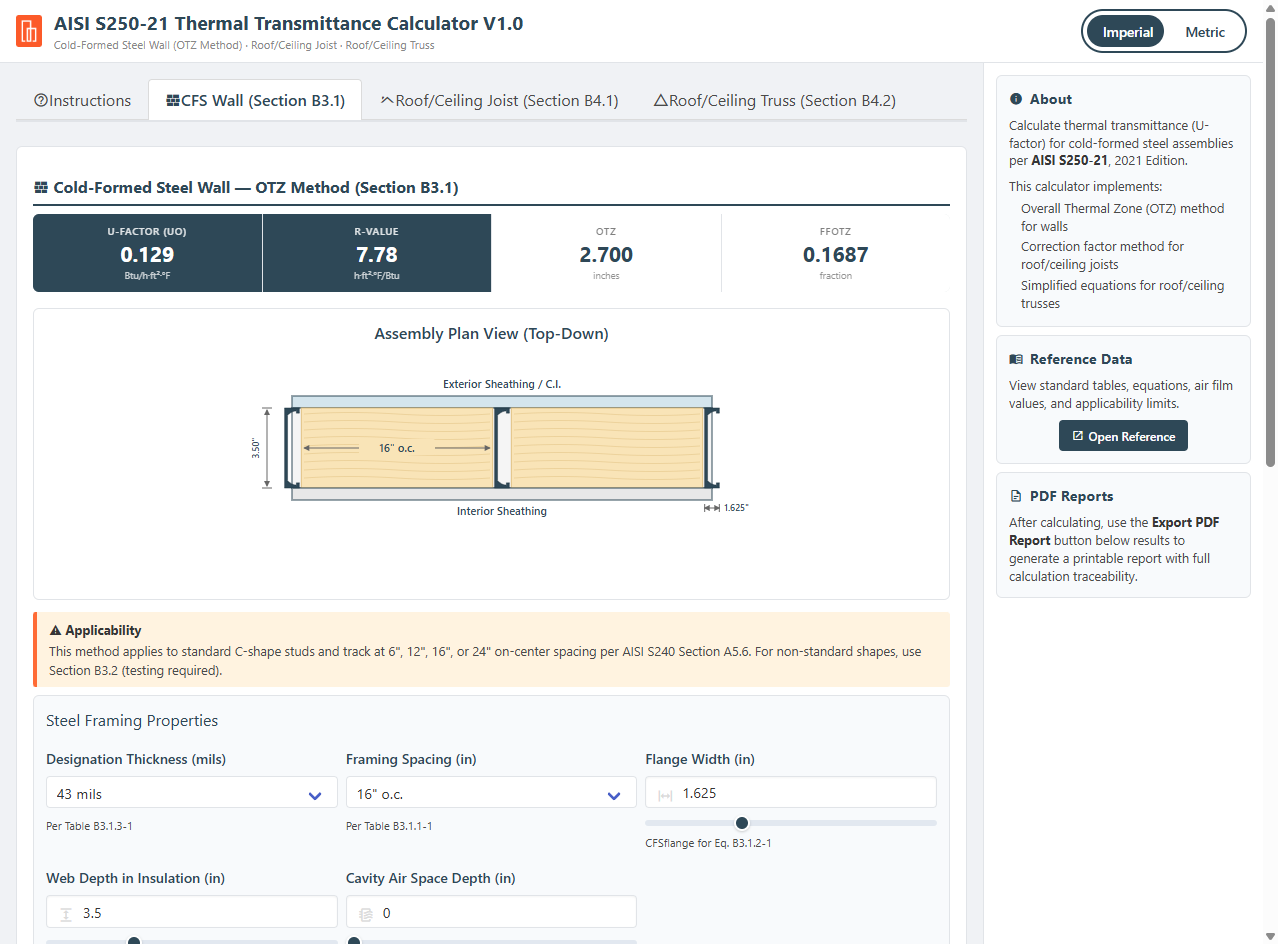
Click "CFS Wall (Section B3.1)" in the tab bar. A results banner appears at the top with placeholder values, and the interactive assembly diagram sits below it.
**Step 2: Set steel framing properties**
Select the designation thickness from the dropdown (33, 43, 54, or 68 mils). For non-standard thicknesses, select "Custom (interpolated)..." and enter any value between 33 and 68 mils. Select framing spacing (6", 12", 16", or 24" o.c.). Enter the flange width and web depth in insulation. If the cavity has an air space adjacent to the insulation, enter its depth; otherwise leave at zero.
The assembly diagram updates as you change inputs, showing your configuration in plan view.
**Step 3: Enter insulation and component R-values**
Enter the cavity insulation R-value (Rins) and exterior continuous insulation R-value (Rshe). Then enter R-values for exterior siding, exterior sheathing, and interior sheathing.
**Step 4: Read results**
Results update automatically in the top banner and in the detailed results panel below the inputs. The banner shows U-factor, R-value, OTZ width, and FFotz at a glance. The results panel adds visual bar charts and a full numeric breakdown.
**Step 5: Verify and export**
Expand "View Calculation Steps" to audit every intermediate value against the standard. Click "Export PDF Report" to generate a printable document with the assembly diagram, all inputs, results, and the complete calculation trace.
#### Calculate a Roof/Ceiling Joist U-Factor (1 minute)
**Step 1:** Click the "Roof/Ceiling Joist (Section B4.1)" tab.
**Step 2:** Select joist depth, joist spacing, and cavity insulation R-value from the dropdowns. For R-values between R-30 and R-49, select "Custom (interpolated)..." and enter any value in that range.
**Step 3:** Enter Rs-roof — the cumulative R-value of all assembly layers *except* the steel framing and cavity insulation. This includes air films, ceiling finish, sheathing, and membranes.
**Step 4:** Results appear immediately in the top banner (U-factor, R-value, correction factor Fc) and in the detailed results panel below.
#### Calculate a Roof/Ceiling Truss U-Factor (1 minute)
**Step 1:** Click the "Roof/Ceiling Truss (Section B4.2)" tab.
**Step 2:** Enter the bottom chord insulation R-value.
**Step 3:** Select the rigid foam configuration: None, R-3, or R-5. This determines which equation the calculator uses.
**Step 4:** Enter truss spacing (must be ≥ 24" o.c.).
**Step 5:** Results appear in the top banner and results panel. The truss method is the simplest — two cells showing U-factor and R-value.
### Understanding the Inputs
#### Wall Calculator — Steel Framing Properties
**Designation Thickness (mils):** The nominal steel thickness per AISI standards. Standard values are 33, 43, 54, and 68 mils. Each maps to a specific thermal conductivity (k) in Table B3.1.3-1 and a set of OTZ regression coefficients in Table B3.1.1-1. Non-standard values between 33 and 68 trigger linear interpolation of both k and all six OTZ coefficients.
**Framing Spacing:** On-center spacing of studs. The standard provides OTZ coefficients for 6", 12", 16", and 24" o.c. Wider spacing reduces thermal bridging because there are fewer studs per unit area. This is a fixed dropdown — no interpolation between spacing values.
**Flange Width (CFSflange):** The width of the C-shape stud flange in inches. Typical values range from 1.25" to 2.0" for standard studs. This determines the C-shape framing factor FFcs in Equation B3.1.2-1. Wider flanges mean more steel contact area per stud.
**Web Depth in Insulation (CFSdepth):** The depth of the stud web that sits within the insulated cavity. Used in Equation B3.1.3-1 to calculate the thermal resistance of the steel path (Rs-wall = CFSdepth / k). Deeper webs create a longer thermal path through the steel, which slightly increases resistance.
**Cavity Air Space Depth (CFSwebairspace):** If the cavity includes an air gap alongside the insulation, enter its depth. The calculator adds an air space resistance (Rair = 0.91 h·ft²·°F/Btu) and creates a second parallel-path zone (Equations B3.1.4-1 and B3.1.4-2). Leave at zero for fully insulated cavities.
#### Wall Calculator — Insulation R-Values
**Cavity Insulation (Rins):** R-value of the insulation placed between studs in the cavity. Common values: R-13 for 3.5" fiberglass batts, R-15 for 3.5" mineral wool, R-19 for 6" batts. This is the primary driver of assembly performance.
**Exterior Continuous Insulation (Rshe):** R-value of rigid insulation installed outboard of the sheathing and spanning continuously across studs. This is the most effective way to break the thermal bridge. Common values: R-5 for 1" XPS, R-6.5 for 1" polyiso. The OTZ polynomial (Equation B3.1.1-1) includes both Rcav and Rshe terms, capturing the interaction between cavity and continuous insulation.
#### Wall Calculator — Other Assembly Components
**Exterior Siding (Sideext):** R-value of the outermost cladding layer. Examples: stucco ≈ 0.07, vinyl siding ≈ 0.62, brick veneer ≈ 0.44, wood siding ≈ 0.81. Small values have minimal impact on overall U-factor.
**Exterior Sheathing (Sheathext):** R-value of the sheathing layer on the exterior side of the cavity. Examples: 1/2" gypsum ≈ 0.56, 1/2" plywood ≈ 0.63, 7/16" OSB ≈ 0.62. This is distinct from the continuous insulation (Rshe).
**Interior Sheathing (Sheathint):** R-value of the interior finish layer. Examples: 1/2" gypsum board ≈ 0.56, 5/8" gypsum board ≈ 0.70.
#### Roof/Ceiling Joist Calculator
**Joist Depth:** Depth of the C-shape ceiling joist or rafter. Options are 3.5"–4", 6", 8", 10", and 12". Deeper joists have lower Fc correction factors because the steel web creates a larger thermal bridge relative to the insulation.
**Joist Spacing:** 16" or 24" on-center. 24" spacing gives higher Fc values (less thermal bridging per unit area) than 16" spacing.
**Cavity Insulation R-Value (Rins):** R-30, R-38, or R-49 from the standard tables. For intermediate values (e.g., R-35), select "Custom (interpolated)..." and the calculator linearly interpolates Fc between the bounding standard values per Table B4.1-1 Note 2.
**Rs-roof:** The sum of all non-cavity, non-steel assembly R-values. This typically includes:
* Exterior air film (Ro = 0.17)
* Interior air film (Ri = 0.68)
* Ceiling finish (e.g., 1/2" gypsum ≈ 0.56)
* Roof sheathing, membranes, above-deck insulation
A typical minimum value is about 1.41 (air films + 1/2" gypsum). The calculator adds this in series with the Fc·Rins product.
#### Roof/Ceiling Truss Calculator
**Bottom Chord Insulation R-Value (Rins):** The R-value of insulation installed at the bottom chord level. This feeds directly into the truss equations. Unlike the joist calculator, there is no Fc lookup — the equations already embed the correction.
**Rigid Foam Below Truss:** Determines which equation is used:
* **None** → Eq. B4.2-1: Ut = 1 / (0.864·Rins + 0.330)
* **R-3** → Eq. B4.2-2: Ut = 1 / (0.864·Rins + 4.994)
* **R-5** → Eq. B4.2-3: Ut = 1 / (0.864·Rins + 7.082)
The additive constants (0.330, 4.994, 7.082) are regression-derived values that capture air films, gypsum, and rigid foam contributions. Do not add additional air film or gypsum R-values to the truss result — they are already embedded.
**Truss Spacing:** Must be ≥ 24" on-center per Section B4.2. The calculator enforces this as a hard stop. Spacing does not appear in the equations but is a validity constraint — the equations were derived assuming wide spacing with minimal thermal bridging from web members.
#### Unit System
Use the Imperial/Metric toggle in the header to switch between unit systems. Per Section A3 of the standard, all calculations are performed internally in U.S. customary (Imperial) units. When metric mode is active, inputs display in metric units, are converted to Imperial before calculation, and results are converted back for display.
Conversion factors:
| Conversion | Factor |
| ---------------- | --------------------------------- |
| R-value to RSI | × 0.17611 m²·K/W per h·ft²·°F/Btu |
| U-factor to U-SI | × 5.67826 W/m²·K per Btu/h·ft²·°F |
| inches to mm | × 25.4 |
### How the Calculation Works
#### Wall — OTZ Method (Section B3.1)
The OTZ method is a modified parallel-path approach that accounts for lateral heat flow around steel studs. A standard parallel-path calculation uses only the stud thickness as the framing fraction, which underestimates thermal bridging because heat spreads laterally through the stud flanges into a wider zone. The OTZ method defines an Overall Thermal Zone — a wider effective width of wall area thermally influenced by each stud — and uses this as the framing fraction instead.
**Step 1: Thermal conductivity.** Look up k from Table B3.1.3-1 based on designation thickness. For non-standard thicknesses, linearly interpolate.
| Designation Thickness (mils) | k (Btu/h·ft²·°F) |
| ---------------------------- | ---------------- |
| 33 | 381 |
| 43 | 495 |
| 54 | 622 |
| 68 | 783 |
**Step 2: Cavity R-value.** Assemble Rcav from cavity insulation and any air space. If both insulation and an air space exist, Rcav = Rins + 0.91. If only insulation, Rcav = Rins. If only air space, Rcav = 0.91. If neither, Rcav = 0.
**Step 3: OTZ coefficients.** Look up C₀ through C₅ from Table B3.1.1-1 based on framing spacing and designation thickness. The table has 16 rows (4 spacings × 4 thicknesses). For non-standard thicknesses, interpolate all six coefficients.
**Step 4: OTZ width.** Calculate using the second-order polynomial:
```
OTZ = C₀ + C₁·Rcav + C₂·Rshe + C₃·Rcav² + C₄·Rshe² + C₅·Rcav·Rshe
```
The result is in inches — the effective thermal influence zone of one stud.
**Step 5: C-shape framing factor.** Calculate the steel fraction within the OTZ zone:
```
FFcs = (CFSt / 1000) / CFSflange
```
This converts mil thickness to inches, then divides by flange width. Typical values are 0.02–0.05.
**Step 6: Steel web resistance.** Calculate the R-value of the steel web path:
```
Rs-wall = CFSdepth / k
```
This is very small (typically 0.004–0.009) because steel is highly conductive.
**Step 7: Parallel-path through insulated cavity.** Within the OTZ zone, heat flows through two parallel paths — the insulation and the steel web:
```
U₁ = (1 − FFcs) / Rins + FFcs / Rs-wall
R₁ = 1 / U₁
```
**Step 8: Parallel-path through air space (if present).** Same approach for any air space zone:
```
U₂ = (1 − FFcs) / Rair + FFcs / (CFSwebairspace / k)
R₂ = 1 / U₂
```
If no air space, R₂ = 0.
**Step 9: Combined cavity resistance.** Sum the insulation and air space zones:
```
R₃ = R₁ + R₂
```
**Step 10: C-shape path total resistance.** Sum all layers in series through the framing path:
```
Rsps = Ro + Sideext + Rshe + Sheathext + R₃ + Sheathint + Ri
```
Where Ro = 0.17 (exterior air film) and Ri = 0.68 (interior air film).
**Step 11: Cavity path total resistance.** Sum all layers in series through the non-framing path:
```
Rspc = Ro + Sideext + Rshe + Sheathext + Rins + Rair + Sheathint + Ri
```
**Step 12: OTZ framing factor.** The fraction of wall area within the OTZ influence zone:
```
FFotz = OTZ / FS
```
Where FS is the on-center framing spacing. Typical values are 0.15–0.25.
**Step 13: Overall U-factor.** Weighted parallel-path average:
```
Uo = (1 − FFotz) / Rspc + FFotz / Rsps
```
The overall R-value is 1/Uo.
#### Roof/Ceiling Joist (Section B4.1)
The joist method uses a correction factor approach. Instead of calculating steel thermal bridging explicitly through parallel paths, a tabulated correction factor (Fc) reduces the nominal cavity insulation R-value to an effective value.
**Step 1: Correction factor lookup.** Read Fc from Table B4.1-1 based on joist depth, spacing, and insulation R-value. The table covers depths from 3.5" to 12", spacings of 16" and 24", and R-values of R-30, R-38, and R-49.
For intermediate R-values between R-30 and R-49, linearly interpolate between the two bounding table values per Note 2. For example, R-35 at 12" depth, 24" spacing interpolates between Fc at R-30 (0.35) and Fc at R-38 (0.61).
Fc values range from 0.27 (worst case: deep joists, close spacing, low insulation) to 0.97 (best case: shallow joists, wide spacing, high insulation). Values below 1.0 mean the steel bridging reduces the effective insulation performance.
**Step 2: U-factor calculation.**
```
Ur = 1 / (Rs-roof + Fc · Rins)
```
The product Fc·Rins is the effective cavity insulation R-value. Rs-roof is added in series to represent all other assembly layers. The overall R-value is 1/Ur.
#### Roof/Ceiling Truss (Section B4.2)
The truss method uses simplified closed-form equations. Trusses have wider spacing (≥ 24" o.c.) and the steel bottom chord represents a smaller fraction of the ceiling area, so the thermal bridging effect is less severe than with joists.
**Step 1: Select equation.** Based on rigid foam configuration:
| Foam | Equation | Formula |
| ---- | -------- | ----------------------------- |
| None | B4.2-1 | Ut = 1 / (0.864·Rins + 0.330) |
| R-3 | B4.2-2 | Ut = 1 / (0.864·Rins + 4.994) |
| R-5 | B4.2-3 | Ut = 1 / (0.864·Rins + 7.082) |
**Step 2: Calculate.** Substitute Rins and solve. The coefficient 0.864 represents the fraction of insulation performance retained after steel bridging. The additive constants are regression-derived values that embed air film resistances, gypsum board, and any rigid foam — do not add these separately.
### Reading the Results
#### Top Banner
Each calculator tab has a results banner immediately below the section title. The banner is always visible — it starts faded with placeholder dashes, then transitions to full opacity once the first calculation completes (automatically on page load with default values).
**Wall banner:** Four cells showing U-Factor (Uo), R-Value, OTZ width, and FFotz. The U-factor and R-value cells are highlighted in dark blue.
**Roof banner:** Three cells showing U-Factor (Ur), R-Value, and Correction Factor (Fc).
**Truss banner:** Two cells showing U-Factor (Ut) and R-Value.
All banner values update in real time and switch units when you toggle Imperial/Metric.
#### Result Bars
Below the inputs, the results panel includes visual bar charts for U-factor and R-value. The U-factor bar fills left-to-right where more fill means worse performance (higher heat loss). The R-value bar fills left-to-right where more fill means better performance (higher insulation value). Scale markings provide context for typical ranges.
#### Numeric Results
The detailed results section lists all key outputs with labels matching the standard's variable names:
* **Wall:** OTZ (inches), FFotz (fraction), Overall U-Factor (Uo), Overall R-Value
* **Roof:** Correction Factor (Fc), U-Factor (Ur), Overall R-Value
* **Truss:** U-Factor (Ut), Overall R-Value
#### Calculation Steps
Expand "View Calculation Steps" to see the complete verification trace. This shows every input value, intermediate calculation, and equation reference in a monospaced format suitable for peer review. Each step is labeled with the corresponding equation number from the standard (e.g., "STEP 4: Calculate OTZ (Eq. B3.1.1-1)").
When metric mode is active, the trace shows the Imperial values used internally for calculation, with metric conversions appended to the final results.
#### PDF Reports
Click "Export PDF Report" to open a print-ready document in a new browser tab. The report includes:
* Better Building branded header with timestamp and unit system
* Assembly diagram (SVG, taken from the calculator)
* Input parameters table
* Results table
* Complete calculation steps trace
* Footer citing the standard and [www.betterbuilding.io](http://www.betterbuilding.io)
Use your browser's "Save as PDF" or print function to save the document. If the print window doesn't open, check that pop-ups are allowed for the page.
### Common Scenarios
#### Scenario 1: Code Compliance U-Factor Check
Designer needs to verify a CFS wall assembly meets energy code U-factor requirements.
1. Open the Wall tab
2. Enter the stud specifications: 43 mil, 16" o.c., 1.625" flange, 3.5" web depth
3. Enter R-13 cavity insulation, no exterior continuous insulation
4. Enter component R-values: stucco siding (0.07), 1/2" gypsum each side (0.56)
5. Read the U-factor from the top banner
6. Compare against code requirement (e.g., IECC climate zone threshold)
7. Export PDF for the compliance documentation package
Result: Documented U-factor calculation traceable to AISI S250-21 for permit submission.
#### Scenario 2: Evaluating Continuous Insulation Impact
Engineer wants to quantify the improvement from adding exterior continuous insulation.
1. Calculate the wall U-factor with Rshe = 0 (no continuous insulation)
2. Note the U-factor and R-value
3. Adjust the Rshe slider upward (R-5, R-10, R-15)
4. Watch the banner update in real time — observe how the OTZ width and FFotz change
5. Compare results to identify the minimum Rshe needed to hit a target U-factor
Result: Parametric understanding of continuous insulation benefit, with live feedback via sliders.
#### Scenario 3: Steel Thickness Sensitivity Study
Specifier wants to understand how stud gauge affects thermal performance.
1. Set up the wall assembly with typical values
2. Select 33 mil thickness — note U-factor
3. Switch to 43 mil — note the increase in U-factor (thicker steel conducts more)
4. Switch to 68 mil — note further degradation
5. Select "Custom (interpolated)..." and sweep the slider from 33 to 68
6. Use the live banner to observe the smooth change in U-factor
Result: Quantified impact of steel thickness on assembly performance for value engineering.
#### Scenario 4: Roof Assembly Comparison
Designer comparing joist-framed vs. truss-framed roof assemblies.
1. Open the Roof/Ceiling Joist tab
2. Set 12" depth, 24" spacing, R-38 insulation, Rs-roof = 1.41
3. Note the U-factor from the banner
4. Switch to the Truss tab
5. Enter R-38 insulation, no foam, 24" spacing
6. Compare U-factors between the two approaches
7. Try adding R-3 or R-5 rigid foam on the truss to see the improvement
8. Export PDF reports for both to include in the design documentation
Result: Side-by-side comparison of joist vs. truss thermal performance with full traceability.
#### Scenario 5: Metric Project
International project team working in SI units.
1. Toggle "Metric" in the header
2. All inputs switch to mm and m²·K/W (RSI)
3. Enter values in metric — the calculator converts internally to Imperial for calculation
4. Results display in W/m²·K and RSI
5. Verification steps show Imperial values used in calculation with metric conversions at the end
6. Export PDF report — it notes the unit system used
Result: Metric-native workflow with transparent conversion per Section A3.
#### Scenario 6: Peer Review and Auditing
Reviewer needs to verify a submitted U-factor calculation.
1. Enter the inputs from the submitted calculation
2. Expand "View Calculation Steps" to see every intermediate value
3. Compare each step against a hand calculation or the submitted report
4. Check that OTZ coefficients match Table B3.1.1-1 for the specified spacing and thickness
5. Verify the Fc value matches Table B4.1-1 for roof calculations
6. Confirm that interpolation was applied correctly for non-standard values
7. Export a PDF for the review file
Result: Independent verification with full equation-level traceability.
### Limitations
This tool implements the analytical methods in AISI S250-21 Appendix B. It is suitable for code compliance calculations, design comparisons, and preliminary analysis.
**What it is:**
* A standards-compliant U-factor calculator for CFS walls, roof joists, and trusses
* Suitable for energy code compliance documentation
* Implements the OTZ method, correction factor method, and simplified truss equations exactly as published
* Extensible between standard table values via linear interpolation where the standard permits
**What it isn't:**
* A substitute for ASTM C1363 hot-box testing when required by the standard
* Applicable to non-standard CFS shapes (use Section B3.2 for testing-based methods)
* A full energy model — it calculates steady-state U-factors, not annual energy performance
* Applicable to assemblies outside the stated applicability limits
**Applicability constraints enforced by the calculator:**
* Wall designation thickness must be between 33 and 68 mils (no extrapolation)
* Wall framing spacing must be 6", 12", 16", or 24" o.c. (no interpolation between spacings)
* Roof joist insulation must be between R-30 and R-49
* Roof joist base steel thickness must not exceed 0.064 inches
* Truss spacing must be ≥ 24" o.c.
* Maximum 3 truss web penetrations per 4-foot length (user responsibility to verify)
**Interpolation:** The calculator performs linear interpolation for non-standard designation thicknesses (wall OTZ coefficients and thermal conductivity) and non-standard roof insulation R-values (Fc correction factors) where the standard explicitly permits it. It does not extrapolate beyond table boundaries.
**Web holes:** The OTZ coefficients in Table B3.1.1-1 assume no web holes. Real assemblies with punched or patterned web openings may have different thermal bridging characteristics not captured by this method.
**Steady-state assumption:** All calculations are steady-state — they assume constant temperature conditions across the assembly. Thermal mass effects, moisture transport, and transient behavior are not modeled.
### Technical Reference
#### Key Constants
| Constant | Value | Source |
| ----------------------- | ----------------- | -------------- |
| Exterior air film (Ro) | 0.17 h·ft²·°F/Btu | Section B3.1.6 |
| Interior air film (Ri) | 0.68 h·ft²·°F/Btu | Section B3.1.6 |
| Cavity air space (Rair) | 0.91 h·ft²·°F/Btu | Section B3.1.6 |
| R-value to RSI | × 0.17611 | Section A3 |
| U-factor to U-SI | × 5.67826 | Section A3 |
| inches to mm | × 25.4 | Section A3 |
#### Equations Implemented
| Equation | Description | Section |
| -------- | --------------------------------------------------------------------- | ------- |
| B3.1.1-1 | OTZ = C₀ + C₁·Rcav + C₂·Rshe + C₃·Rcav² + C₄·Rshe² + C₅·Rcav·Rshe | B3.1.1 |
| B3.1.2-1 | FFcs = (CFSt/1000) / CFSflange | B3.1.2 |
| B3.1.3-1 | Rs-wall = CFSdepth / k | B3.1.3 |
| B3.1.3-2 | U₁ = (1−FFcs)/Rins + FFcs/Rs-wall | B3.1.3 |
| B3.1.3-3 | R₁ = 1/U₁ | B3.1.3 |
| B3.1.4-1 | U₂ = (1−FFcs)/Rair + FFcs/(CFSwebairspace/k) | B3.1.4 |
| B3.1.4-2 | R₂ = 1/U₂ | B3.1.4 |
| B3.1.5-1 | R₃ = R₁ + R₂ | B3.1.5 |
| B3.1.6-1 | Rsps = Ro + Sideext + Rshe + Sheathext + R₃ + Sheathint + Ri | B3.1.6 |
| B3.1.6-2 | Rspc = Ro + Sideext + Rshe + Sheathext + Rins + Rair + Sheathint + Ri | B3.1.6 |
| B3.1.7-1 | FFotz = OTZ / FS | B3.1.7 |
| B3.1.8-1 | Uo = (1−FFotz)/Rspc + FFotz/Rsps | B3.1.8 |
| B4.1-1 | Ur = 1 / (Rs-roof + Fc·Rins) | B4.1 |
| B4.2-1 | Ut = 1 / (0.864·Rins + 0.330) — no foam | B4.2 |
| B4.2-2 | Ut = 1 / (0.864·Rins + 4.994) — R-3 foam | B4.2 |
| B4.2-3 | Ut = 1 / (0.864·Rins + 7.082) — R-5 foam | B4.2 |
#### Tables Implemented
| Table | Description | Entries |
| -------- | ------------------------------------------------------- | --------- |
| B3.1.1-1 | OTZ Coefficients (C₀–C₅) by spacing and thickness | 16 rows |
| B3.1.3-1 | Steel thermal conductivity (k) by designation thickness | 4 values |
| B4.1-1 | Correction factors (Fc) by depth, spacing, and R-value | 30 values |
#### Default Input Values
| Input | Default (Imperial) | Notes |
| ------------------------ | ------------------ | ------------------------ |
| Designation Thickness | 43 mils | Standard stud gauge |
| Framing Spacing | 16" o.c. | Most common residential |
| Flange Width | 1.625" | Standard C-shape |
| Web Depth | 3.5" | 3-5/8" stud cavity |
| Cavity Air Space | 0" | Fully insulated |
| Cavity Insulation (Rins) | R-13 | Fiberglass batt |
| Exterior C.I. (Rshe) | R-0 | No continuous insulation |
| Siding | R-0.07 | Stucco |
| Ext. Sheathing | R-0.56 | 1/2" gypsum |
| Int. Sheathing | R-0.56 | 1/2" gypsum |
| Joist Depth | 12" | Deep roof framing |
| Joist Spacing | 24" o.c. | Standard roof |
| Roof Insulation | R-38 | Mid-range |
| Rs-roof | 1.5 | Air films + gypsum |
| Truss Insulation | R-38 | Mid-range |
| Truss Foam | None | Eq. B4.2-1 |
| Truss Spacing | 24" | Minimum allowed |
#### Slider Ranges
| Input | Min | Max | Step |
| ------------------------ | ---- | ------- | ----- |
| Flange Width | 0.5" | 4" | 0.125 |
| Web Depth | 0" | 12" | 0.25 |
| Cavity Air Space | 0" | 6" | 0.25 |
| Cavity Insulation (Rins) | R-0 | R-40 | 0.5 |
| Exterior C.I. (Rshe) | R-0 | R-30 | 0.5 |
| Siding | R-0 | R-2 | 0.01 |
| Ext./Int. Sheathing | R-0 | R-5 | 0.05 |
| Custom Thickness | 33 | 68 mils | 1 |
| Rs-roof | R-0 | R-15 | 0.1 |
| Custom Roof Rins | R-30 | R-49 | 0.5 |
| Truss Rins | R-1 | R-60 | 1 |
| Truss Spacing | 24" | 48" | 1 |
---
# Agent Instructions
This documentation is published with GitBook. GitBook is the documentation platform designed so that both humans and AI agents can read, navigate, and reason over technical content effectively. Learn more at gitbook.com.
## Querying This Documentation
If you need additional information that is not directly available in this page, you can query the documentation by asking a question.
Perform an HTTP GET request on the following URL with the `ask` and `goal` query parameters:
```
GET https://docs.betterbuilding.io/user-guide/tools-and-plugins/aisi-s250-21-thermal-transmittance-calculator.md?ask=&goal=
```
`ask` is the immediate question: it should be specific, self-contained, and written in natural language.
`goal` is what the user is ultimately trying to achieve, the reason they need the answer. Sharing it helps GitBook give you a better, more relevant answer. A goal is most helpful when it describes the outcome the user wants rather than restating the question. For example, with `ask=how do I create an API token`, a goal like `automate deployments from our CI pipeline` lets GitBook tailor the answer to that use case.
The response will contain a direct answer to the question and relevant excerpts and sources from the documentation.
Use this mechanism when the answer is not explicitly present in the current page, you need clarification or additional context, or you want to retrieve related documentation sections.