> For the complete documentation index, see [llms.txt](https://docs.betterbuilding.io/llms.txt). Markdown versions of documentation pages are available by appending `.md` to page URLs; this page is available as [Markdown](https://docs.betterbuilding.io/user-guide/workflows/designer-mode/airflow-networks/model-settings.md).
# Model Settings
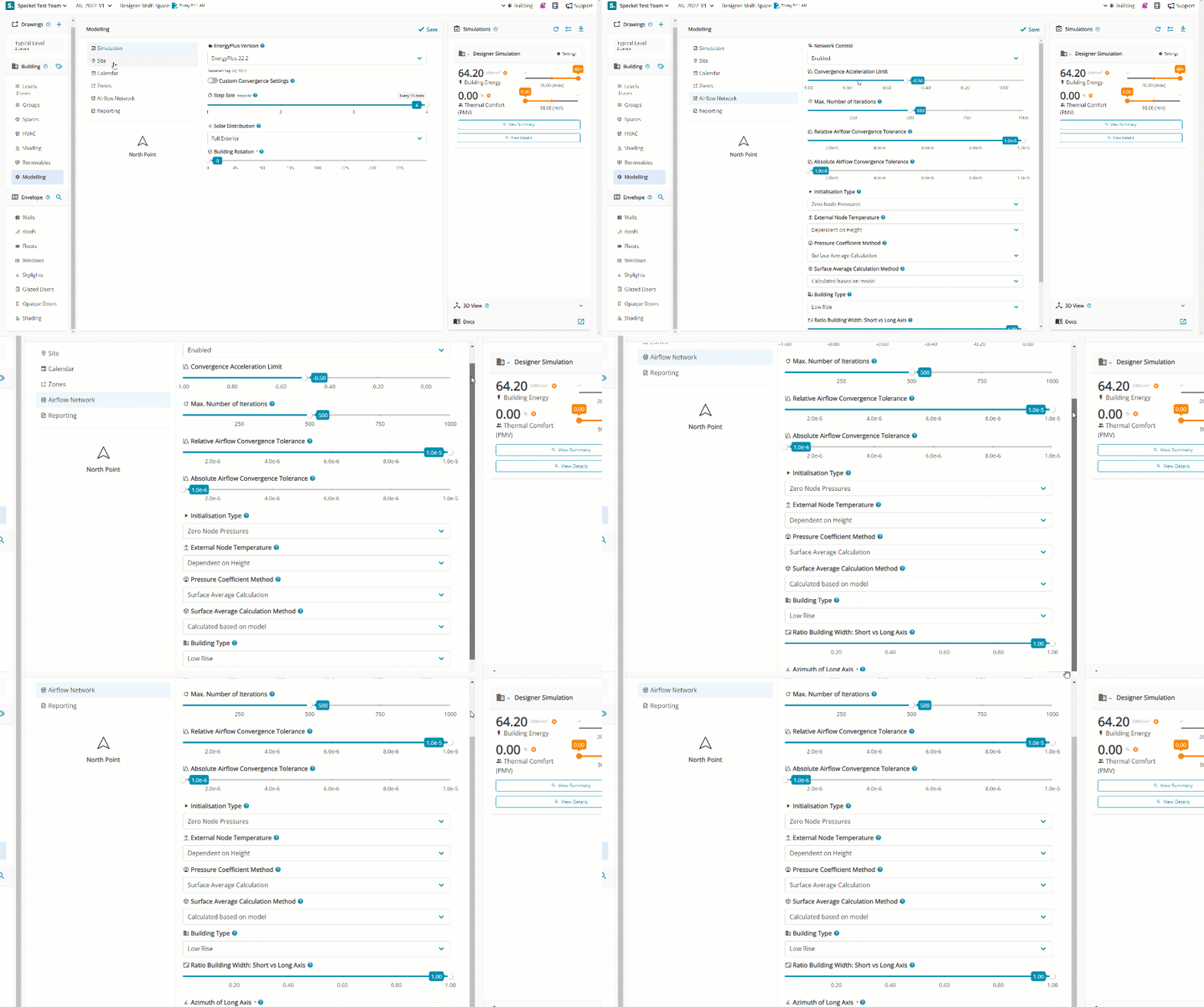
Airflow Network model settings are complex and generally for advanced users. Settings can be deemed as acceptable defaults and should only be adjusted after understanding the function of each.
It is generally acceptable to focus on [Building Type](#building-type) nominations for models where pressure coefficients are calculated. Where pressure coefficients are provided via references to a building code or CFD modelling, Input must be nominated under [Pressure Coefficient Method](#pressure-coefficient-method).
## Network Control
Enable the Airflow Network by selecting 'enabled' from the dropdown menu.
## Convergence Acceleration Limit
The Convergence Acceleration Limit determines the threshold for employing the Steffensen acceleration algorithm when the ratio of successive pressure corrections falls below values in the acceptable range of -1 to 1. The default setting is -0.5.
## Max. Number of Iterations
The maximum number of iterations allowed in finding an Airflow Network solution. If the number of iterations at each simulation timestep is above the maximum number of iterations defined by this field, Speckel may not find a solution and a Severe error is issued and the program is aborted. The default value is 500.
## **Relative Airflow Convergence Tolerance**
The Relative Airflow Convergence Tolerance determines convergence by comparing the absolute sum of network airflows to the sum of their magnitudes. The default value is $$1.0 \times 10^{-4}$$.
## **Absolute Airflow Convergence Tolerance**
The solution is considered to have converged when the summation of the absolute value of all network airflows ($$∣∑𝑚˙𝑖∣∣∑m˙i∣$$) is less than the value specified for this input field. The default value is $$1.0 \times 10^{-6}$$.
## Initialisation Type
The Initialisation Type determines the method used for Airflow Network initialisation. Options include Linear Initialization Method and Zero Node Pressures, with the default being Zero Node Pressures.
## External Node Temperature
Enables the external node temperature to be either dependent on node height or fixed at ground height. The default value is Dependent on Height.
## Pressure Coefficient Method
Determines whether the wind pressure coefficients are input by the user or calculated.
## Surface Average Calculation Method
Determines the wind pressure coefficients for the heat transfer at a surface as calculated or inputs.
## Building Type
Affects the surface average calculation method wind pressure coefficients. Low Rise designates a rectangular building with a height that is both less than three times the width of its footprint and less than three times the length of the footprint. Conversely, High Rise denotes a rectangular building with a height that either exceeds three times the width of the footprint or exceeds three times the length of the footprint.
## Ratio Building Width: Short vs Long Axis
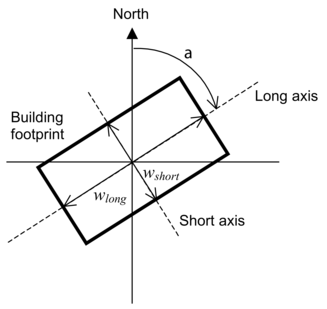
Determines the shape of the building, adjusting the surface average calculation method wind pressure coefficients. Refers to the aspect ratio of a rectangular footprint. It's determined by dividing the width of the footprint along its short axis by the width along the long axis. If the footprint is square, this value is 1.0. The acceptable range for this input is greater than 0 to 1, with a default value of 1.
---
# Agent Instructions
This documentation is published with GitBook. GitBook is the documentation platform designed so that both humans and AI agents can read, navigate, and reason over technical content effectively. Learn more at gitbook.com.
## Querying This Documentation
If you need additional information that is not directly available in this page, you can query the documentation by asking a question.
Perform an HTTP GET request on the following URL with the `ask` and `goal` query parameters:
```
GET https://docs.betterbuilding.io/user-guide/workflows/designer-mode/airflow-networks/model-settings.md?ask=&goal=
```
`ask` is the immediate question: it should be specific, self-contained, and written in natural language.
`goal` is what the user is ultimately trying to achieve, the reason they need the answer. Sharing it helps GitBook give you a better, more relevant answer. A goal is most helpful when it describes the outcome the user wants rather than restating the question. For example, with `ask=how do I create an API token`, a goal like `automate deployments from our CI pipeline` lets GitBook tailor the answer to that use case.
The response will contain a direct answer to the question and relevant excerpts and sources from the documentation.
Use this mechanism when the answer is not explicitly present in the current page, you need clarification or additional context, or you want to retrieve related documentation sections.