> For the complete documentation index, see [llms.txt](https://docs.betterbuilding.io/llms.txt). Markdown versions of documentation pages are available by appending `.md` to page URLs; this page is available as [Markdown](https://docs.betterbuilding.io/user-guide/workflows/designer-mode.md).
# Designer Mode
## Designer Mode on Better Building
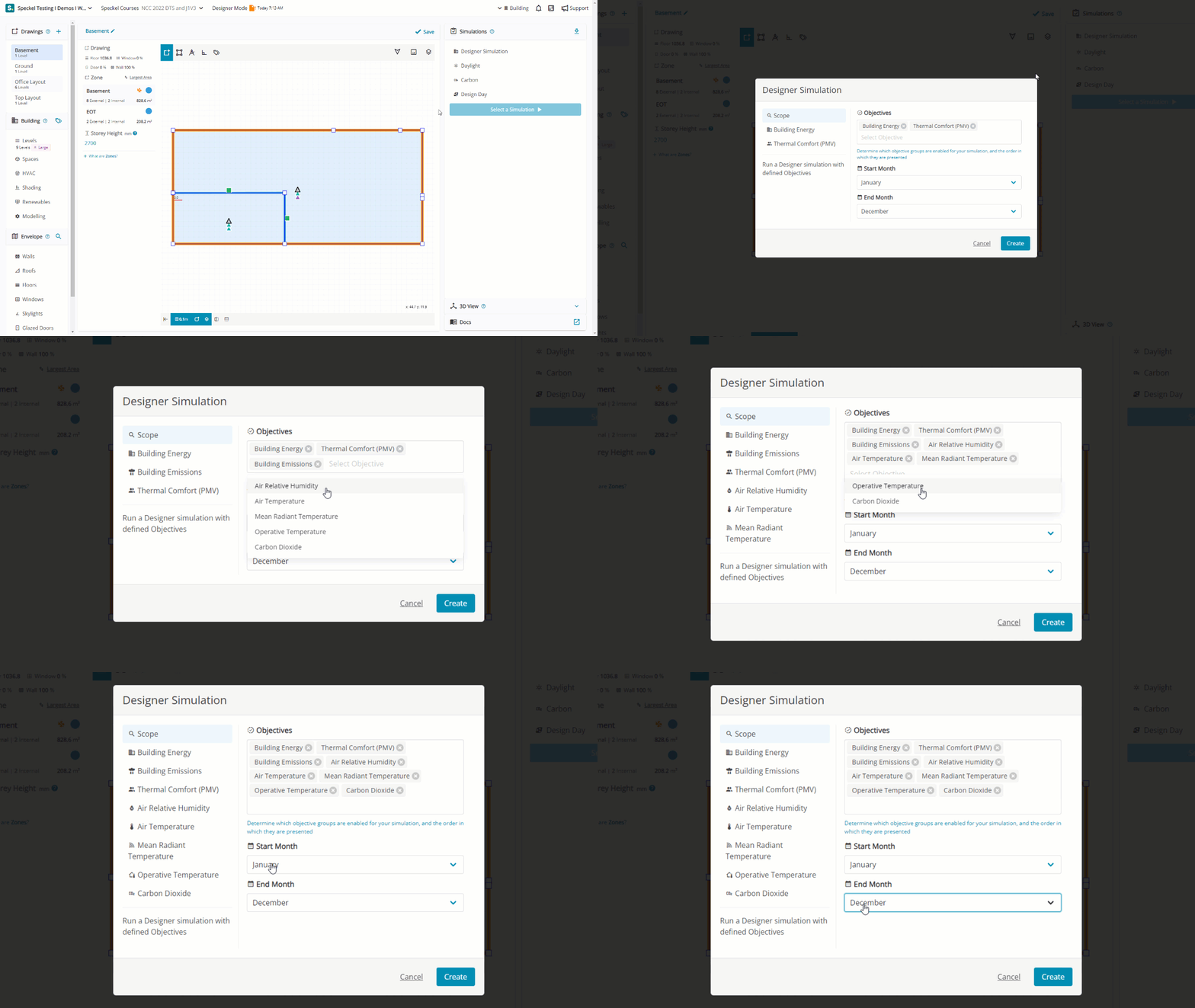
Designer Mode allows you to reuse an existing Design to assess broader objectives against specific targets. Its primary purpose is to enable you to gain complete control and go beyond the objectives of minimum compliance while reusing the geometry and specification.
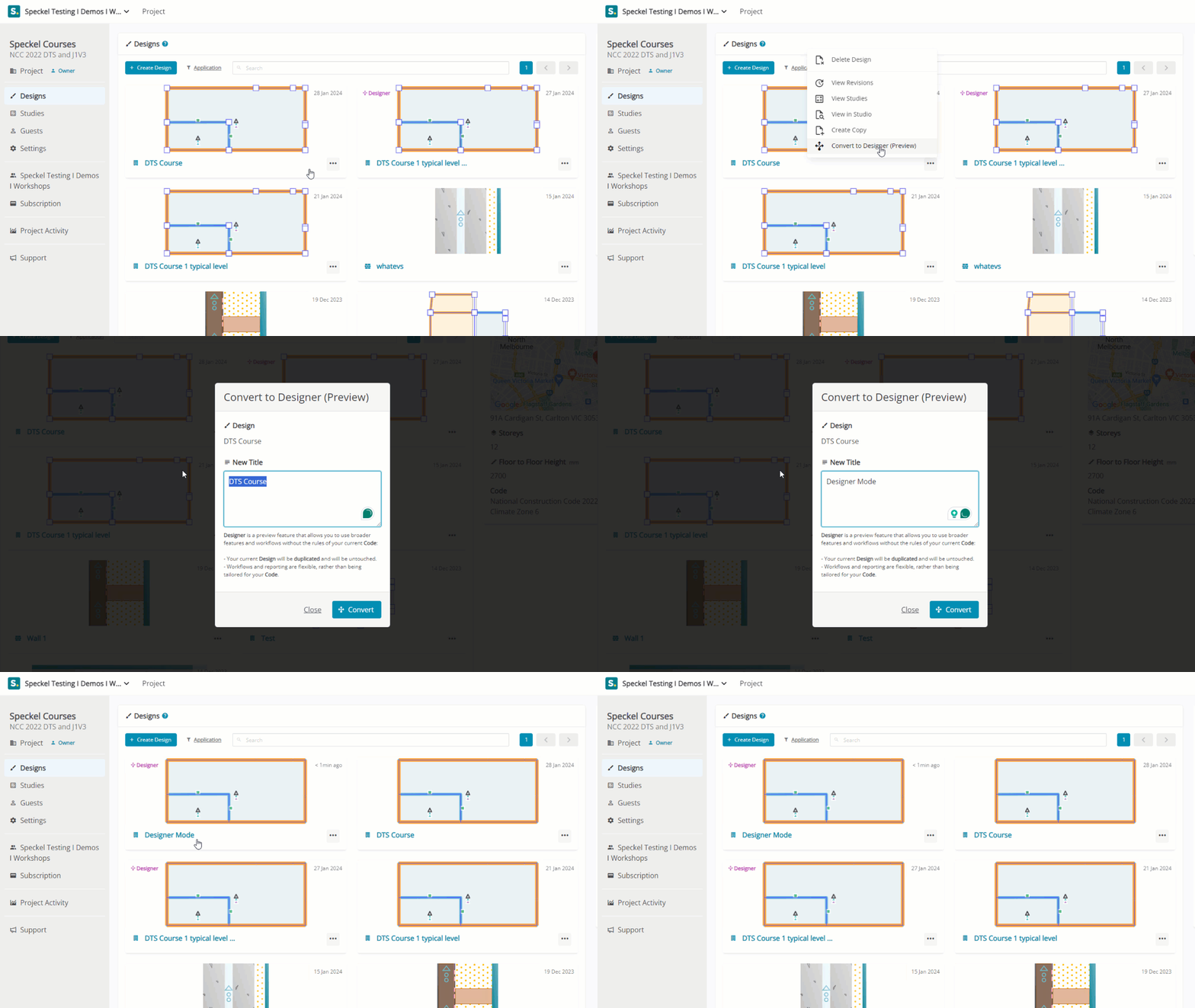
## Convert to Designer Mode
{% hint style="success" %}
To Convert to Designer Mode, locate a [Design](/create-your-first-project/create-a-design.md) you want to copy and select 'Convert to Designer (Preview).
{% endhint %}
## Objectives
An Objective or a set of objectives is determined for a specific duration of time and selected in the order in which you would like them presented in the results.
### Building Energy
Building Energy enables you to set the Scope from either Building Energy Demand, Building Energy Supply, Net Building Energy or Custom Metering. Preferred Units are then determined, with a Target set . Report Titles and Text can be customised.
### Building Emissions
Building Emissions enables you to set the preferred Emission Units with a Target, utilising bespoke emission factors and units. Report Titles and Text can be customised.
### Thermal Comfort (PMV)
Thermal Comfort (PMV) provides a thorough framework to set the Total Area, Min Hours, Min Occupancy and the the Min and Max Value required over a typical day for a single or multiple Spaces. Report Titles and Text can be customised.
### Air Relative Humidity
Air Relative Humidity provides a thorough framework to set the Total Area, minimum hours, minimum occupancy and the the Min and maximum value required over a typical day for a single or multiple Spaces. Report Titles and Text can be customised.
### Air Temperature
Air Temperature provides a thorough framework to set the Total Area, Min Hours, Min Occupancy and the Min and Max Value required over a typical day for a single or multiple Spaces. Report Titles and Text can be customised.
### Mean Radiant Temperature
Mean Radiant Temperature provides a thorough framework to set the Total Area, Min Hours, Min Occupancy and the Min and Max Value required over a typical day for a single or multiple Spaces. Report Titles and Text can be customised.
### Operative Temperature
Operative Temperature provides a thorough framework to set the Total Area, Min Hours, Min Occupancy and the Min and Max Value required over a typical day for a single or multiple Spaces. Report Titles and Text can be customised.
### Carbon Dioxide
Carbon Dioxide provides a thorough framework to set the Total Area, Min Hours, Min Occupancy and the Min and Max Value required over a typical day for a single or multiple Spaces. Report Titles and Text can be customised.
---
# Agent Instructions
This documentation is published with GitBook. GitBook is the documentation platform designed so that both humans and AI agents can read, navigate, and reason over technical content effectively. Learn more at gitbook.com.
## Querying This Documentation
If you need additional information that is not directly available in this page, you can query the documentation by asking a question.
Perform an HTTP GET request on the following URL with the `ask` and `goal` query parameters:
```
GET https://docs.betterbuilding.io/user-guide/workflows/designer-mode.md?ask=&goal=
```
`ask` is the immediate question: it should be specific, self-contained, and written in natural language.
`goal` is what the user is ultimately trying to achieve, the reason they need the answer. Sharing it helps GitBook give you a better, more relevant answer. A goal is most helpful when it describes the outcome the user wants rather than restating the question. For example, with `ask=how do I create an API token`, a goal like `automate deployments from our CI pipeline` lets GitBook tailor the answer to that use case.
The response will contain a direct answer to the question and relevant excerpts and sources from the documentation.
Use this mechanism when the answer is not explicitly present in the current page, you need clarification or additional context, or you want to retrieve related documentation sections.
 ## Convert to Designer Mode