> For the complete documentation index, see [llms.txt](https://docs.betterbuilding.io/llms.txt). Markdown versions of documentation pages are available by appending `.md` to page URLs; this page is available as [Markdown](https://docs.betterbuilding.io/user-guide/2d-building/building/hvac/space-hvac/vrf-terminal-unit/air-loop.md).
# Air Loop
## System
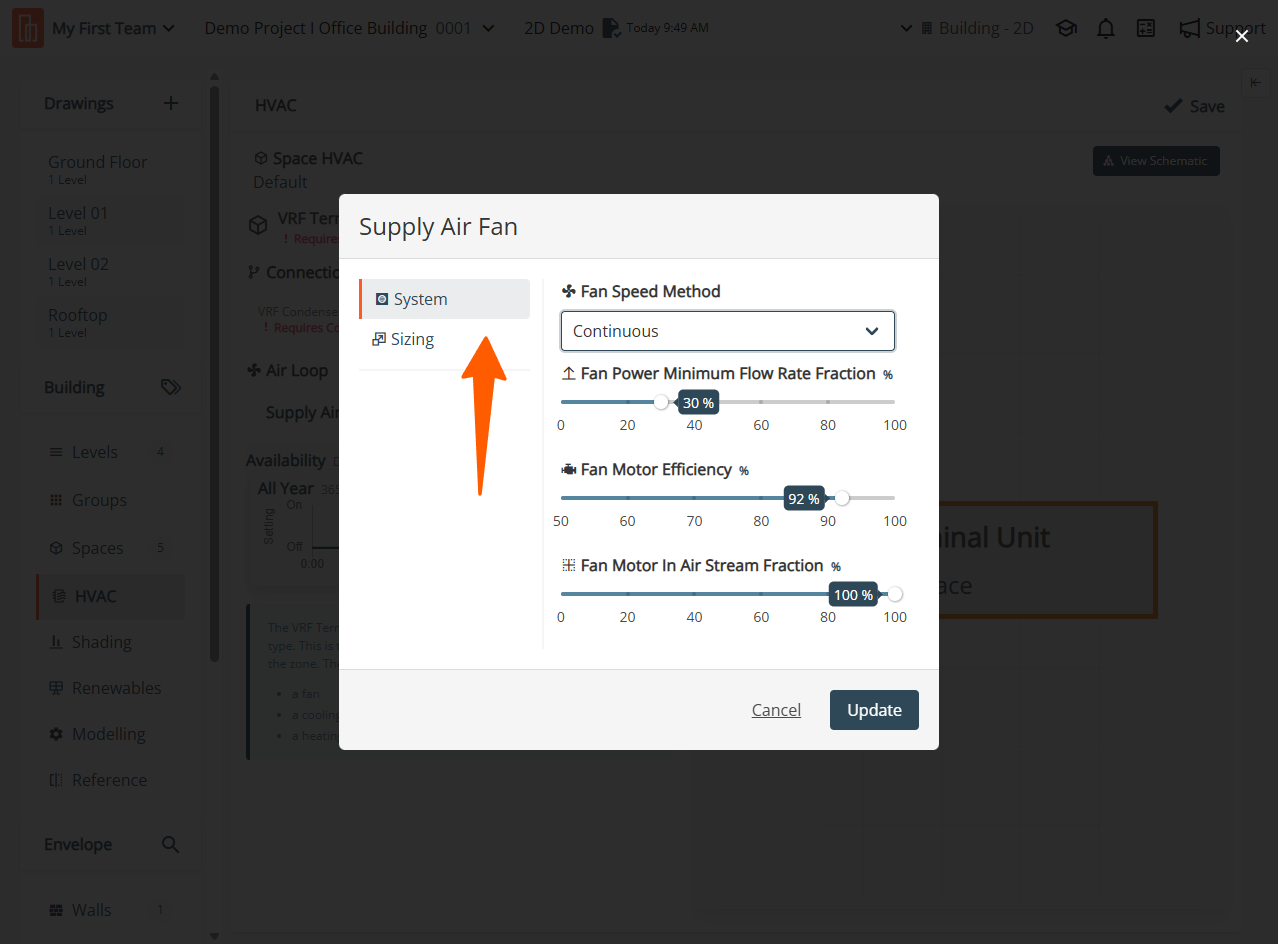
### Fan Speed Method
Specify the Fan Speed Method by choosing either Continuous or Discrete. Discrete allows specific speed settings, while Continuous enables smooth variation up to the Design Maximum Air Flow Rate.
For constant or on-off fans, choose Discrete with Number of Speeds set to 1. Variable air volume fans should use Continuous, requiring a fan performance curve in Electric Power Function of Flow Fraction Curve Name.
### Fan Power Minimum Flow Rate Fraction
Specify the Fan Power Minimum Flow Rate Fraction to determine how low a variable speed fan can operate. This value, a fraction of Design Maximum Air Flow Rate, doesn't enforce a lower limit during simulation. This field is only used when Speed Control Method is set to Continuous.
### Fan Motor Efficiency
Enter the Fan Motor Efficiency by providing a value for motor efficiency - the ratio of shaft power to electric power consumed by the motor.
### Fan Motor In Air Stream Fraction
Specify the Fan Motor In Air Stream Fraction, indicating the fraction of motor heat added to the air stream. A value between 0 and 1 is accepted, where 0 means the motor is outside the air stream with no added heat, and 1 means the motor is entirely inside, adding all of its heat to the air stream.
## Sizing
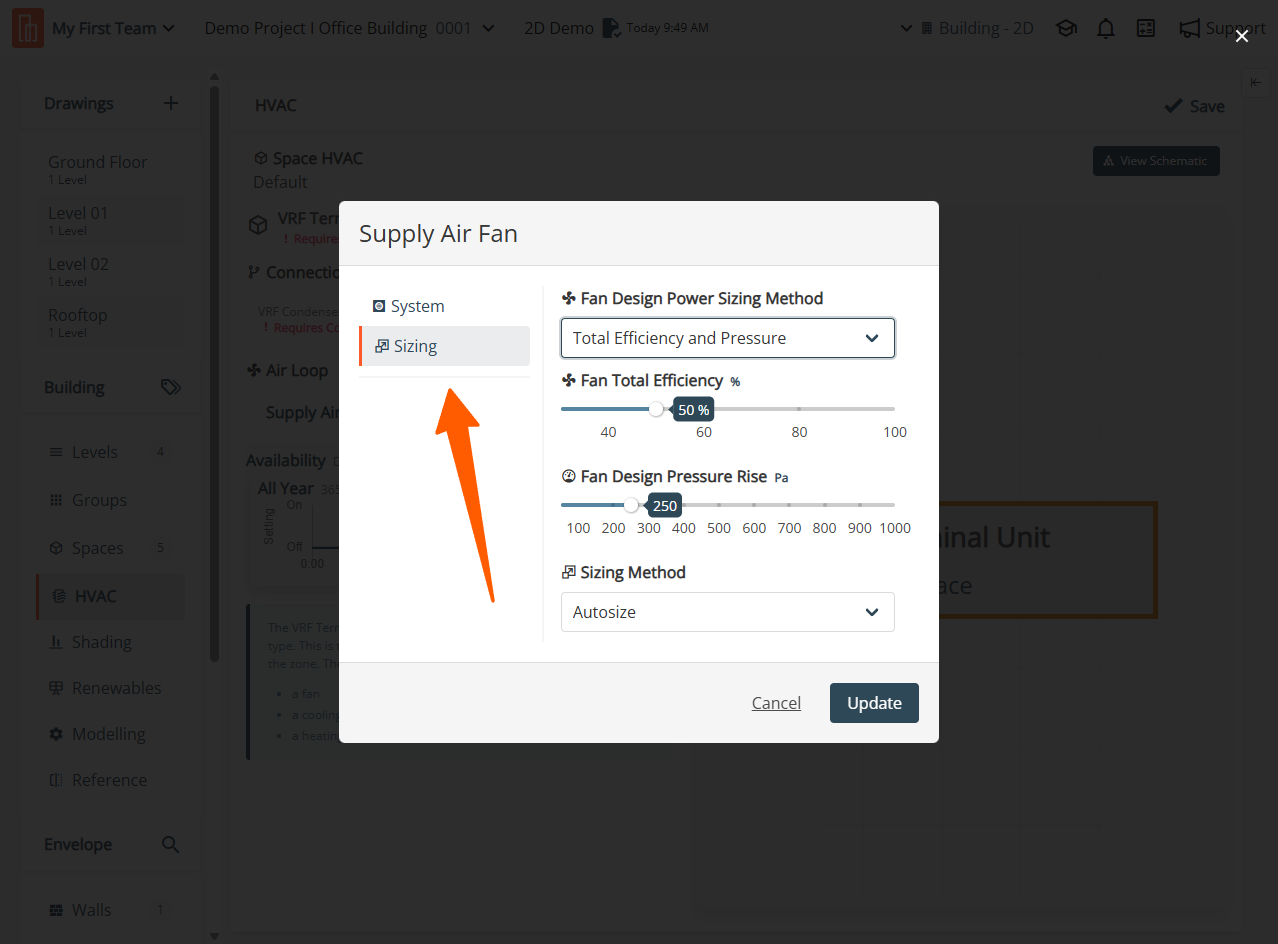
### Fan Design Power Sizing Method
Specify the Fan Design Power Sizing Method by selecting one of Power Per Flow, Power Per Flow Per Pressure, or Total Efficiency And Pressure.
**Power Per Flow:** For Power Per Flow, size the Design Electric Power Consumption using the value of Electric Power Per Unit Flow Rate.
**Power Per Flow Per Pressure:** For Power Per Flow Per Pressure, size the power using the value of Electric Power Per Unit Flow Rate Per Unit Pressure.
**Total Efficiency And Pressure:** For Total Efficiency And Pressure, size the power using the input Fan Total Efficiency and Design Pressure Rise.
### Fan Total Efficiency
Specify the Fan Total Efficiency by providing a value for motor efficiency - the ratio of shaft power to electric power consumed by the motor.
### Fan Design Pressure Rise
Specify the Fan Design Pressure Rise as the total system pressure rise experienced by the fan in Pascals at full flow rate, adjusted for altitude and standard density of dry air at 20 degrees Celsius dry bulb.
### Sizing Method
Specify the Sizing Method by selecting from Autosize or Manual. Manual sizing requires completion of all numerical fields with valid entries.
### Fan Design Maximum Air Flow Rate
Specify the Fan Design Maximum Air Flow Rate as the numeric field for the design volume flow rate of the fan in the HVAC system, in m3/s. This full-speed flow rate serves as the upper limit for fans capable of varying their flow rate and can be autosized.
### Fan Design Electric Power Consumption
Specify the Fan Design Electric Power Consumption as the numeric field for electric power consumption at the full Design Maximum Air Flow Rate and Design Pressure Rise, in Watts. This field is autosizable and defaults to autosize. Choose the sizing method in the following field when autosized.
{% hint style="info" %}
Only on Premium Plans. Please reach for further [support](https://app.gitbook.com/o/WS5BGzA70OvplUrfmCf1/s/fKJnzF2TwHA3APPbiCpF/~/changes/232/support-and-training/contact-us).
{% endhint %}
---
# Agent Instructions
This documentation is published with GitBook. GitBook is the documentation platform designed so that both humans and AI agents can read, navigate, and reason over technical content effectively. Learn more at gitbook.com.
## Querying This Documentation
If you need additional information that is not directly available in this page, you can query the documentation by asking a question.
Perform an HTTP GET request on the following URL with the `ask` and `goal` query parameters:
```
GET https://docs.betterbuilding.io/user-guide/2d-building/building/hvac/space-hvac/vrf-terminal-unit/air-loop.md?ask=&goal=
```
`ask` is the immediate question: it should be specific, self-contained, and written in natural language.
`goal` is what the user is ultimately trying to achieve, the reason they need the answer. Sharing it helps GitBook give you a better, more relevant answer. A goal is most helpful when it describes the outcome the user wants rather than restating the question. For example, with `ask=how do I create an API token`, a goal like `automate deployments from our CI pipeline` lets GitBook tailor the answer to that use case.
The response will contain a direct answer to the question and relevant excerpts and sources from the documentation.
Use this mechanism when the answer is not explicitly present in the current page, you need clarification or additional context, or you want to retrieve related documentation sections.