> For the complete documentation index, see [llms.txt](https://docs.betterbuilding.io/llms.txt). Markdown versions of documentation pages are available by appending `.md` to page URLs; this page is available as [Markdown](https://docs.betterbuilding.io/user-guide/2d-building/building/hvac/plant-hvac/air-handling-unit/cooling-coil.md).
# Cooling Coil
A Cooling Coil is used for air conditioning and cooling purposes. It usually consists of coils through which chilled water or refrigerant circulates. Heat is absorbed as warm air passes over the coils, resulting in cooled and dehumidified air.
## Sizing
### Sizing Method
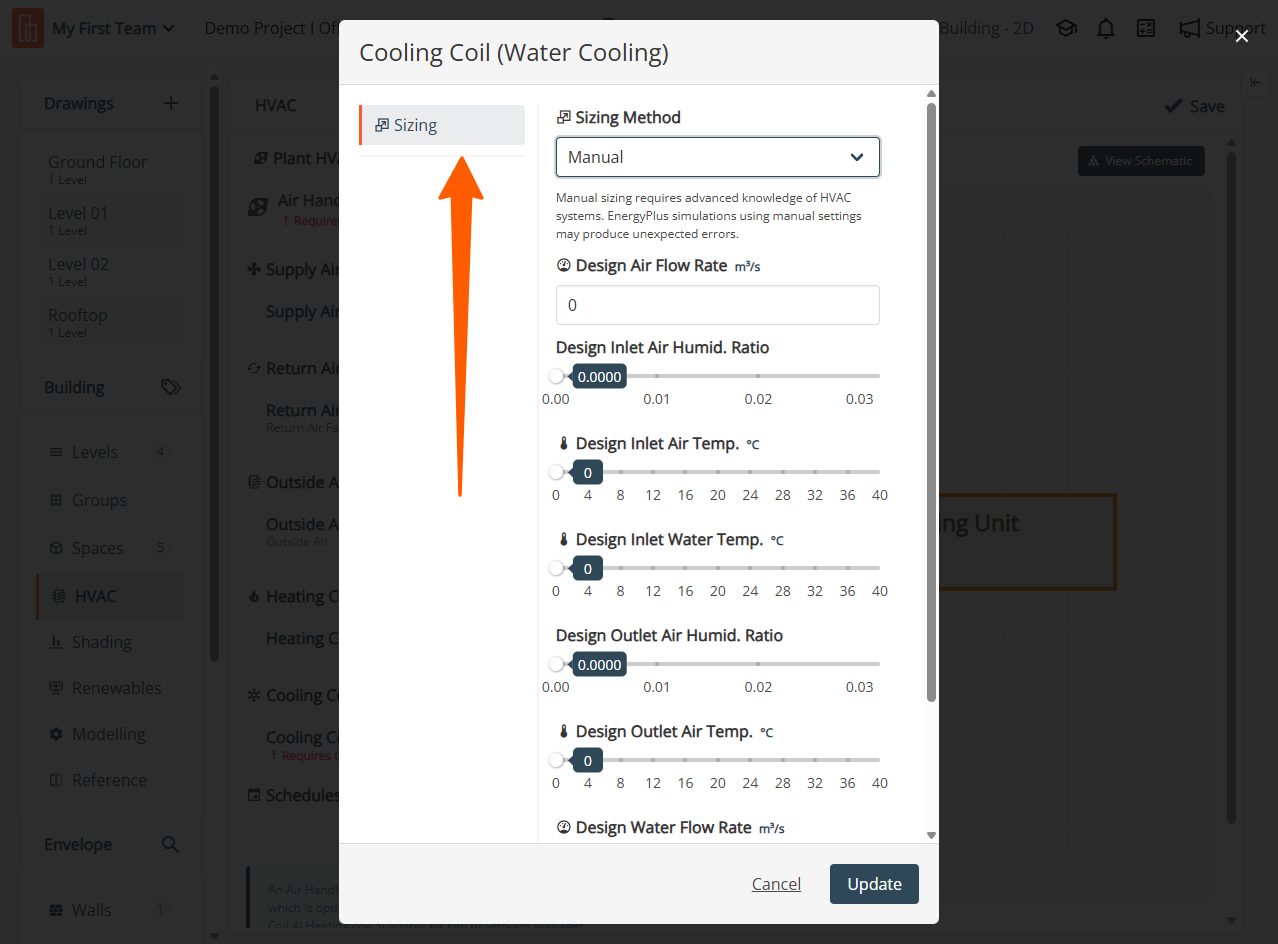
Specify the Sizing Method by choosing between Autosize or Manual. If Manual is chosen, provide all the following necessary sizing parameters.
### Design Air Flow Rate
Specify the Design Air Flow Rate by setting the maximum possible air volume flow rate through the coil, measured in cubic meters per second (m3/s).
### Design Inlet Air Humid. Ratio
Specify the Design Inlet Air Humidity Ratio by setting the highest possible value for the humidity ratio in the design inlet air stream. This is an auto-sizable input, adjusting based on system requirements and conditions. Ensure the value is in kilograms of water per kilogram of dry air (kg Water/kg Dry Air).
### Design Inlet Air Temp
Specify the Design Inlet Air Temperature by setting the inlet air temperature for the design flow, measured in degrees Celsius (°C). This is an auto sizable design input, adjusting based on system requirements and conditions.
### Design Inlet Water Temp
Specify the Design Inlet Water Temperature by setting the inlet water temperature for the design flow, measured in degrees Celsius (°C).
### Design Outlet Air Humid. Ratio
Specify the Design Outlet Air Humidity Ratio by setting the value for the humidity ratio in the design outlet air stream. Ensure the value is in kilograms of water per kilogram of dry air (kg Water/kg Dry Air).
### Design Outlet Air Temp.
Specify the Design Outlet Air Temperature by setting the desired outlet air condition for the design flow, measured in degrees Celsius (°C).
### Design Water Flow Rate
Specify the Design Water Flow Rate by setting the maximum possible water volume flow rate through the coil, measured in cubic meters per second (m3/sec).
### Type of Analysis
Specify the Type of Analysis for the coil. Choose between Simple Analysis and Detailed Analysis. In Simple Analysis, the report indicates the surface area fraction wet of the coil as either dry or wet. On the other hand, Detailed Analysis provides the exact value of the surface area fraction, but it comes with a higher execution time. Consider your specific needs and time constraints when selecting the analysis type for the coil.
{% hint style="info" %}
Only on Premium Plans. Please reach for further [support](https://app.gitbook.com/o/WS5BGzA70OvplUrfmCf1/s/fKJnzF2TwHA3APPbiCpF/~/changes/232/support-and-training/contact-us).
{% endhint %}
---
# Agent Instructions
This documentation is published with GitBook. GitBook is the documentation platform designed so that both humans and AI agents can read, navigate, and reason over technical content effectively. Learn more at gitbook.com.
## Querying This Documentation
If you need additional information that is not directly available in this page, you can query the documentation by asking a question.
Perform an HTTP GET request on the following URL with the `ask` and `goal` query parameters:
```
GET https://docs.betterbuilding.io/user-guide/2d-building/building/hvac/plant-hvac/air-handling-unit/cooling-coil.md?ask=&goal=
```
`ask` is the immediate question: it should be specific, self-contained, and written in natural language.
`goal` is what the user is ultimately trying to achieve, the reason they need the answer. Sharing it helps GitBook give you a better, more relevant answer. A goal is most helpful when it describes the outcome the user wants rather than restating the question. For example, with `ask=how do I create an API token`, a goal like `automate deployments from our CI pipeline` lets GitBook tailor the answer to that use case.
The response will contain a direct answer to the question and relevant excerpts and sources from the documentation.
Use this mechanism when the answer is not explicitly present in the current page, you need clarification or additional context, or you want to retrieve related documentation sections.